Contextual Policies in Omnigent: Using session state to better govern AI agents
How Omnigent enables powerful security and cost controls
by Matei Zaharia, David Nasi, Xiangrui Meng, Kecheng Cao and Tomu Hirata
• Omnigent introduces contextual policies for AI agents: Policies that can track what an agent session has done so far to evaluate whether the next action should proceed.
• Omnigent, as a meta-harness, allows these policies to be applied across any agent it wraps, including coding agents like Claude Code and Codex.
• Contextual policies allow you to define more powerful policies than those available in existing agent harnesses. For example, you can configure per-session spending caps, or guardrails that get stricter as risk accumulates.
We recently launched Omnigent, an open source meta-harness for AI agents. It lets you keep using the agent harnesses you already like, including Claude Code, Codex, and custom agents, while adding a shared layer for collaboration, composition, and policies.
For security and cost management, Omnigent introduces a powerful new tool: contextual policies. Today’s agent frameworks only have simple controls to limit what an agent can do, e.g., rules to allow, deny, or ask the user for various tool calls. But this makes it difficult to create policies that are both secure and convenient for users. In contrast, Omnigent’s contextual policies can remember what happened in a session so far (e.g., what the agent has read or how many dollars it spent so far) and use that state to decide whether the next action should proceed. This enables a huge range of rich policies that are both safer and more convenient for users: from tracking the risk level of a session dynamically, to implementing least-privilege security models, to letting users set budgets for individual tasks to manage spend.
Why agent controls are better with context
AI agents introduce new types of risks to enterprises. For example, because agents can be prompt-injected by untrusted content and asked to perform harmful actions, it is desirable to prevent the same agent from reading untrusted content, accessing sensitive data, and communicating with the outside world (popularized as Simon Willison’s “Lethal Trifecta” and Meta’s “Agents Rule of Two”). Whether an action is “safe” depends, in part, on what happened before: a coding agent pushing to GitHub is generally fine if the agent just worked on a feature for an engineer, but the same GitHub push is risky if the agent had previously downloaded an untrusted web page that might contain an injection attack.
Unfortunately, most agent software today only provides simple allow-list controls or guardrails on individual actions, e.g., whether to allow Git pushes or web searches. To prevent injection attacks, we would have to block at least one of these actions completely, but this would be restrictive for many harmless use cases. Asking the user for approval on each action does not work well either, because users just get fatigued by approval prompts.
The same applies in other situations. Maybe having a sales rep’s agent send an email to a customer is fine, but having it send thousands of emails is indicative of a compromise or a bug. An agent editing a doc it created is OK, but the same agent editing thousands of internal docs may require scrutiny. Indeed, many security tools for human users also consider their history and not just the current action (this is called contextual security).
Enter contextual policies
In Omnigent, a policy can listen to events an agent is performing (e.g., tool calls and responses and inputs and outputs to the LLM) and decide whether to allow, deny, transform the messages, or ask the user for permission, similar to traditional agent guardrails. However, the policy can also update the state about the session: arbitrary variables visible only to that policy. This can include tracking how many times an agent used a specific tool, which documents it read, etc. The Omnigent server remembers the state for each policy and session and passes it to the policy handler the next time it calls the handler. To write a contextual policy, you simply write a function that takes the old state and the new event the agent is attempting to perform, and returns state updates and a decision. Omnigent also comes with a number of useful policies already included.
Moreover, because Omnigent is a meta-harness, it can apply your contextual policies to agents using any harness in the same way. Omnigent supports widely used coding agents such as Claude Code, Codex, Antigravity, Pi, OpenCode and Hermes, as well as custom agents in frameworks such as OpenAI Agents SDK and Claude Agents SDK. Simply launch the agents through Omnigent, and the Omnigent server will intercept their tool calls to apply policies.
Example use cases
Here are the three built-in example policies that ship with Omnigent today. Each relies on a different kind of session state: the content the agent has read so far, an accumulated session risk score, or total cost of the current session.
1. Google Drive Policy: Keep the agent's access scoped to the right documents
The Google Drive policy governs what the agent can read and modify in Docs, Sheets, and Slides. Writes are confined to documents that the agent created during this session by default. So an agent can spin up a new doc and edit it freely, but can't quietly modify a pre-existing file it was never meant to touch. This behavior would not be possible to implement with simple allow-lists: we don’t want to outright allow or deny the “write document” tool, we only want to allow it on documents that the agent created in the same session.
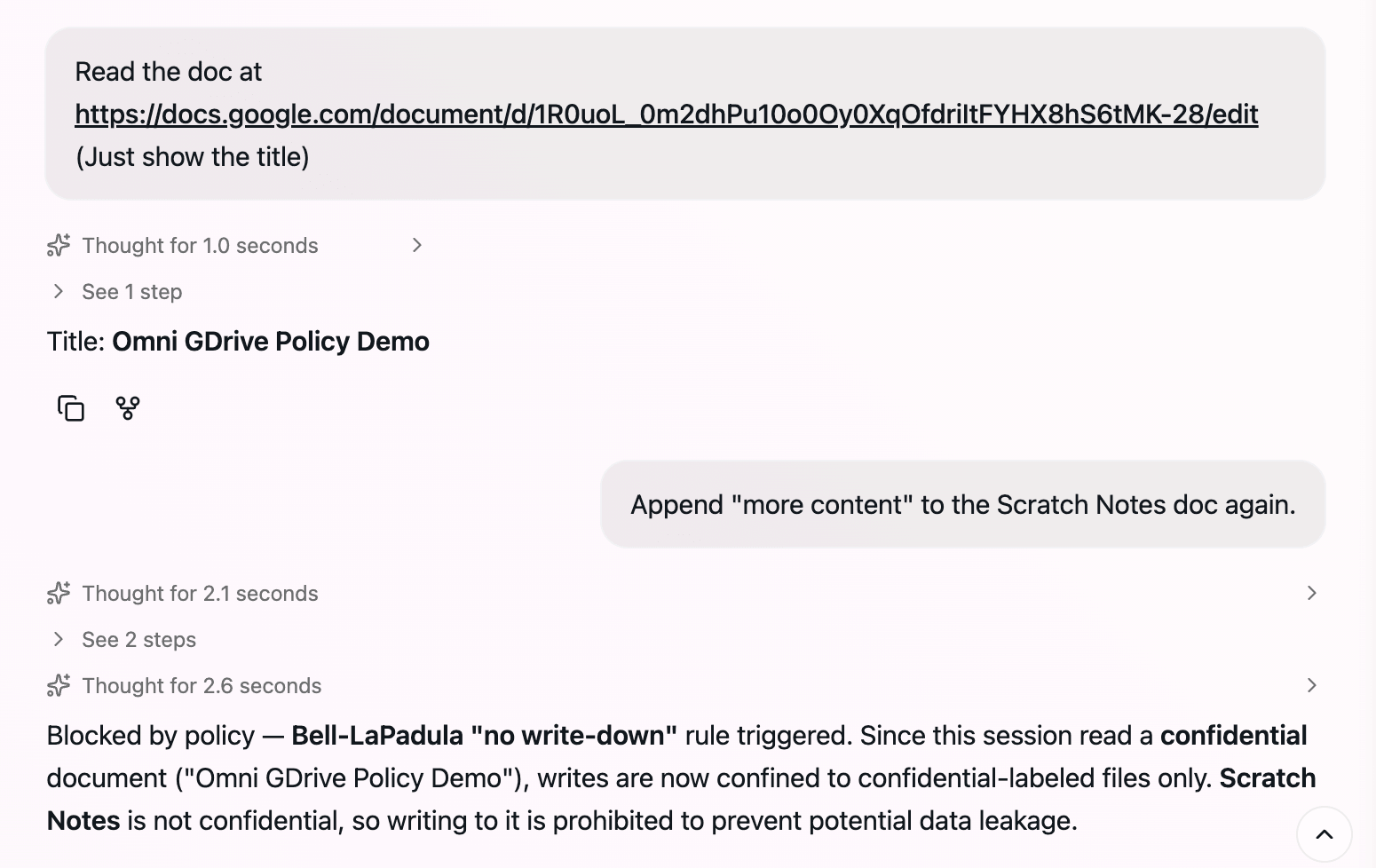
As a second example of contextual behavior in this policy, you can mark a set of documents as confidential: the moment the agent opens one, the policy tightens so that writes are confined to that set. Even a doc the agent created a minute ago becomes off-limits, since appending confidential material to it would leak that content into a less-protected file. In classic security, this implements the Bell-LaPadula model with its "no write-down" rule.
Figure 1: Configuring the Google Drive policy. confidential_files declares which documents are confidential
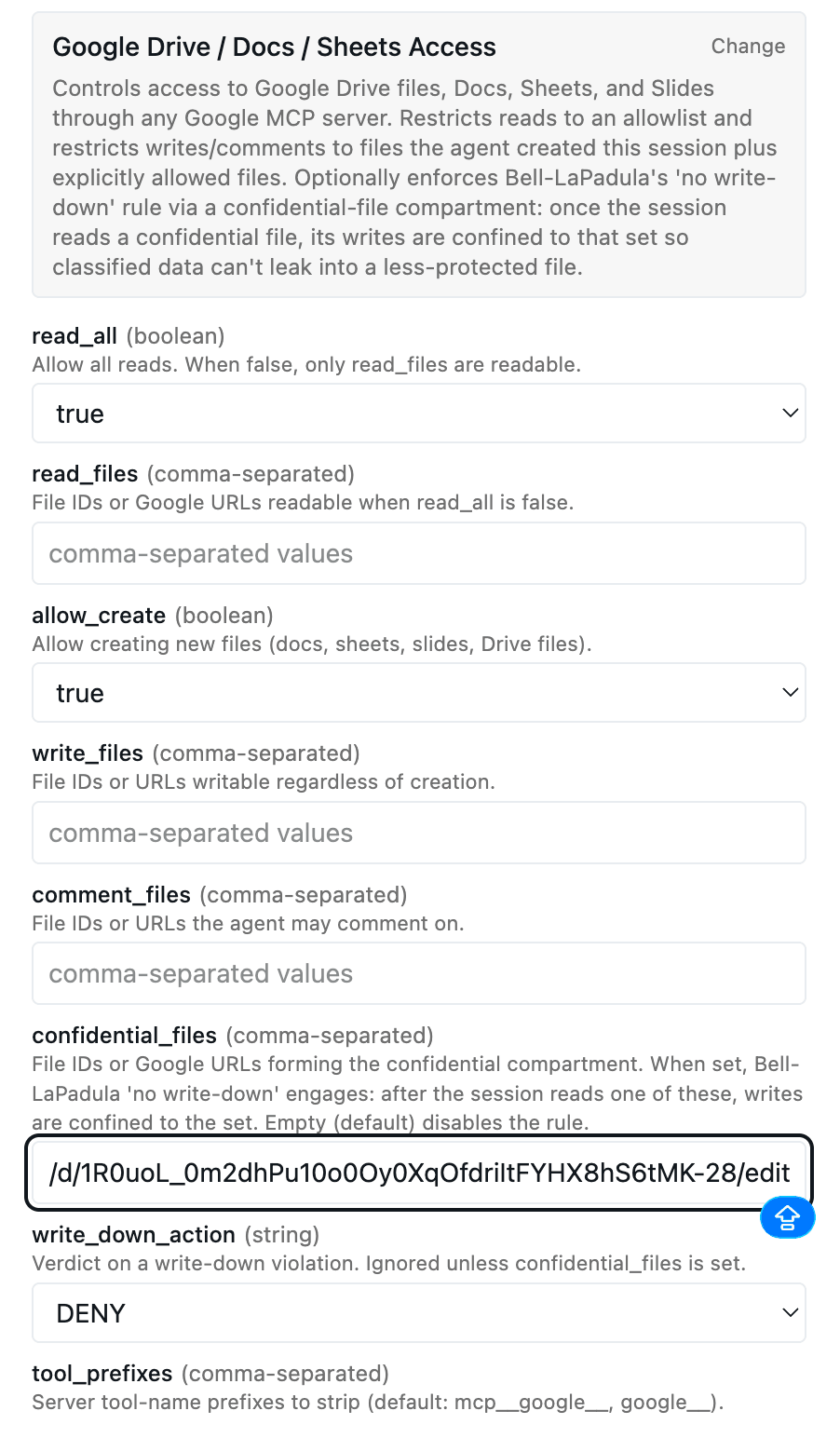
Figure 2: Writes by default are confined to documents the agent created this session
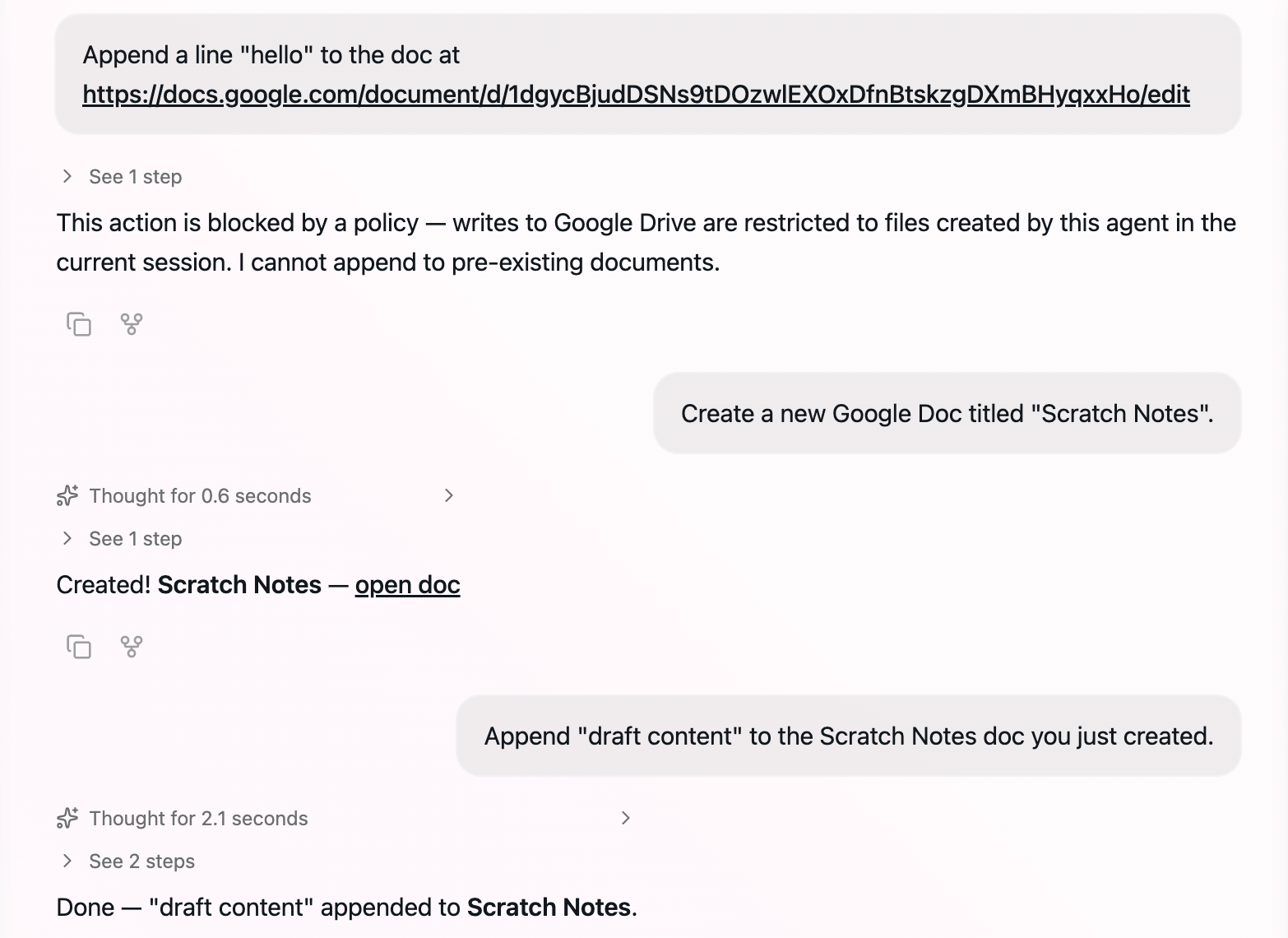
Figure 3: After reading a confidential doc, the same write operation is denied to prevent a write-down leak.
2. Risk Score Policy: Get more cautious as the agent touches sensitive material
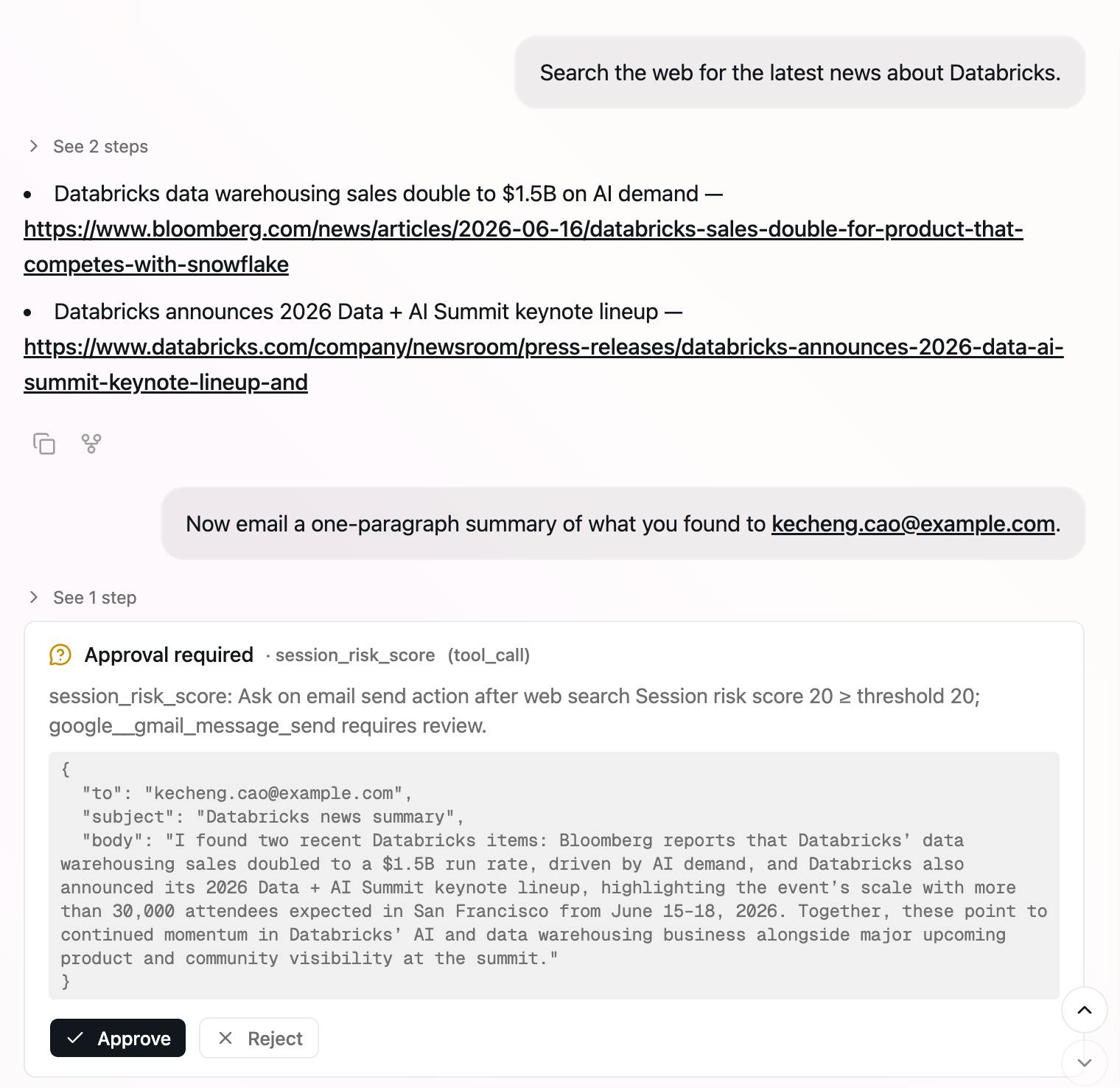
Risk scoring is commonly used by security teams to manage access for humans. In Omnigent, the risk-scoring policy keeps a running score for the current session, a single number that tracks how much risk has built up as the agent works. Users can configure which actions will raise the score and by how much: A routine tool call might add a point or two, while reading a document you've marked highly confidential adds far more scores. As long as the score stays low, the agent works without interruption. Once it crosses a threshold, actions like sending an email or sharing a file will return ASK instead of ALLOW and prompt the user to sign off. So the same email that would have gone out early in a session may require human approval later, once the agent has handled enough sensitive material, which pushes the score up.
Figure 4: Configuring a session-scoped risk score policy
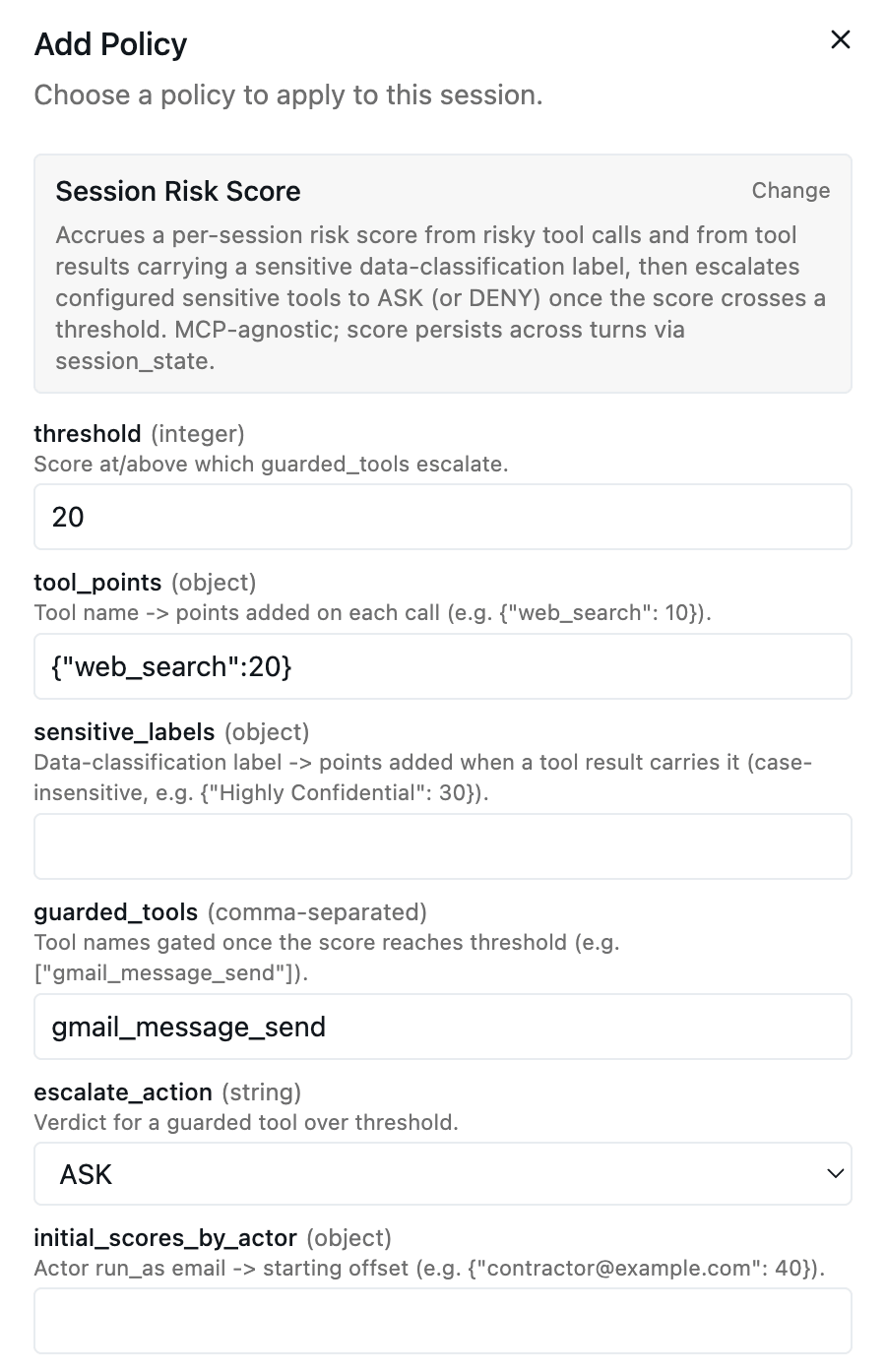
Figure 5: Once a web search lifts the session's risk score to the threshold, sending an email stops being automatic and requires human approval.
3. Cost Policy: Keep spending under control
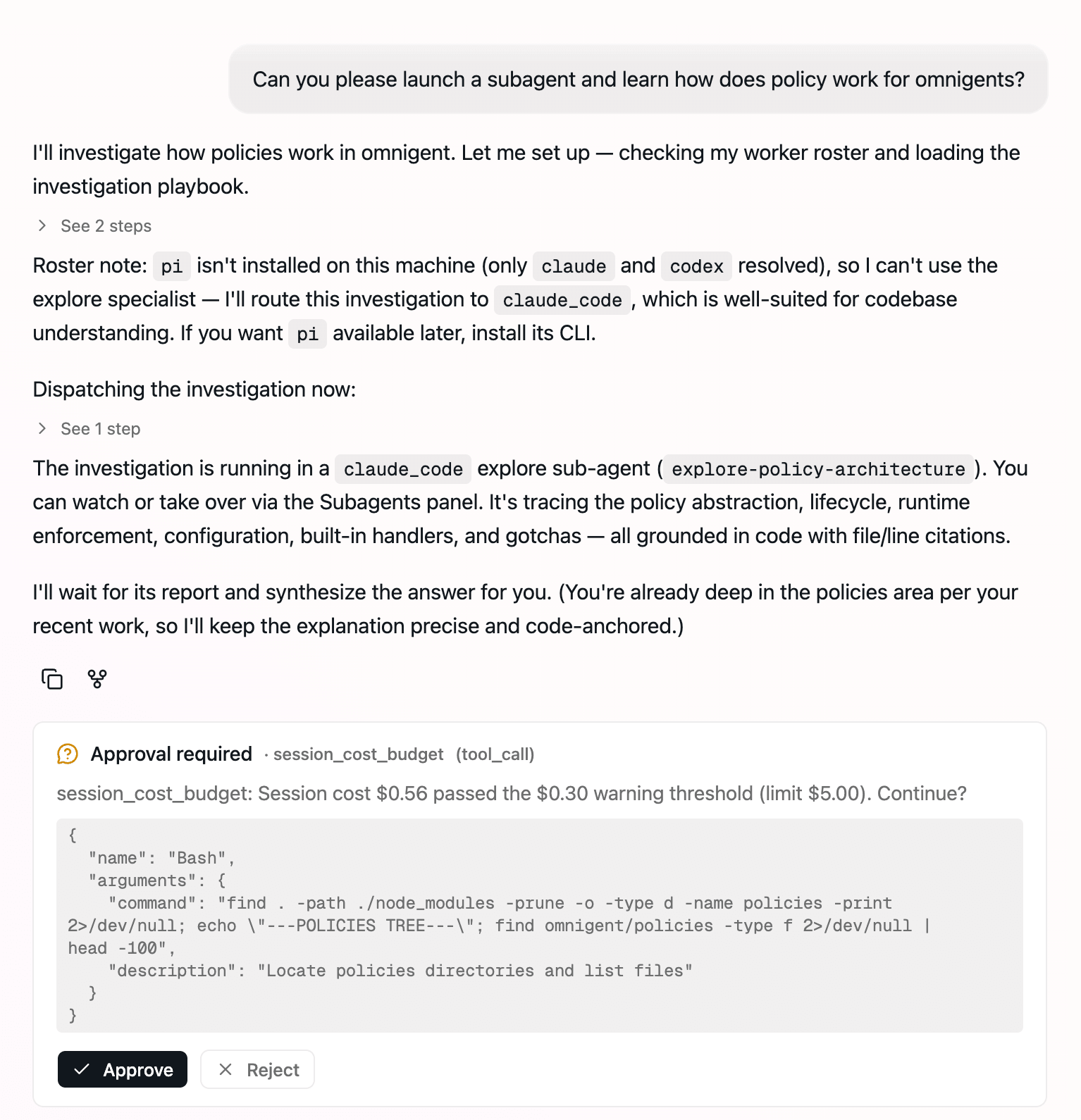
A budget policy tracks how much the session has spent on model calls so far. After crossing a soft threshold, it pauses to ask whether to keep going. When spend hits the hard cap, the policy blocks further calls to the expensive model until the agent switches to a cheaper one, allowing the session to continue rather than stopping. The same idea extends beyond a single session. A platform team can stack a per-user daily cap on top of the per-session one, so no one can rack up costs across many separate conversations. In both cases, the context is cumulative spend: the policy isn't judging any single model call; it's watching the running total and stepping in when the session or the user has spent too much.
Figure 6: Configuring a session-scoped budget policy
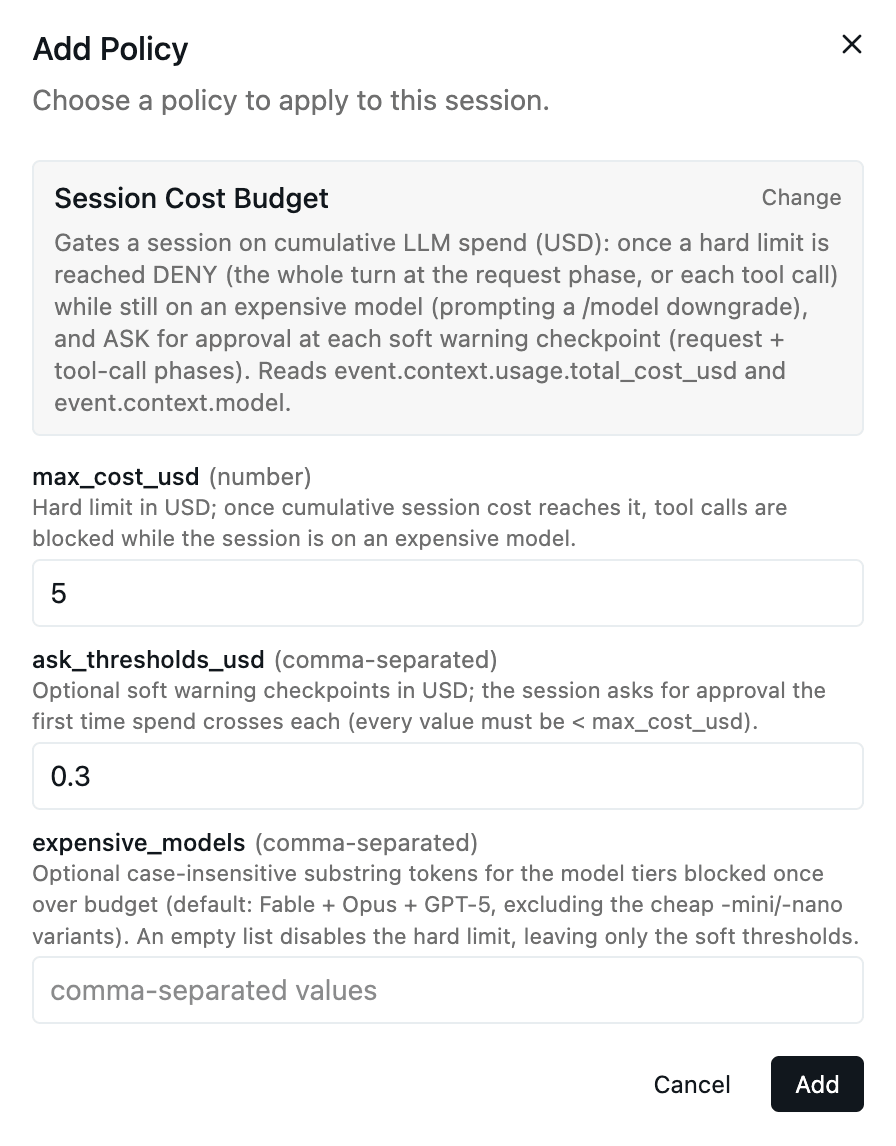
Figure 7: When the session spend crosses the warning threshold, the policy pauses and asks the user to approve continuing.
4. Intent-Based Authorization: Limit privilege based on the purpose
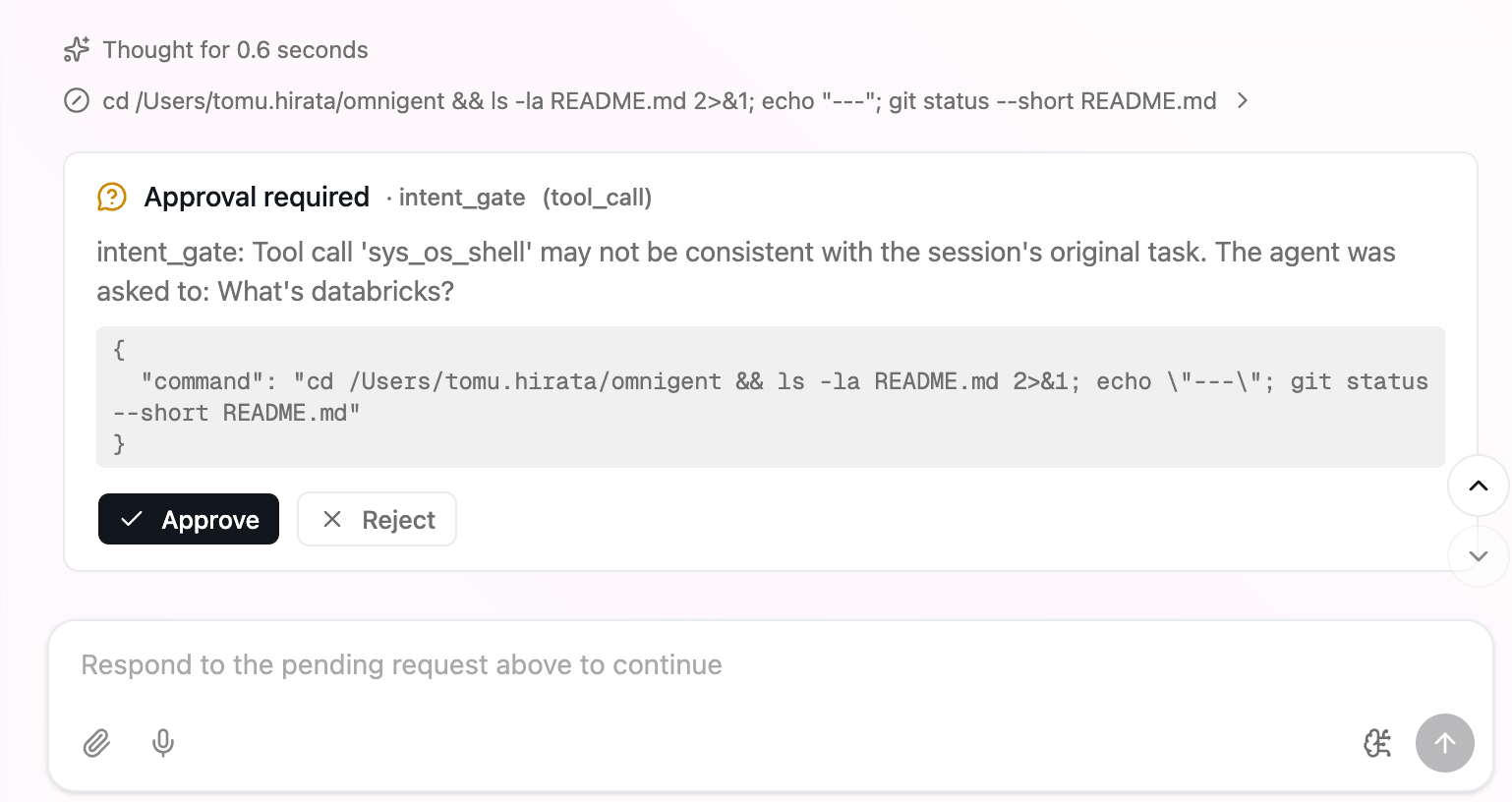
Intent-based authorization sets agents’ permissions based on the user’s initial prompt to them, so that even a prompt-injected agent cannot use most of its tools to cause harm. For example, if you start a session by asking an agent to update a Google Slides presentation, the policy allows that agent to read and write that presentation, but blocks access if the agent suddenly tries to use GitHub. The policy simply remembers what the user actually asked for at the start of a session as state, then checks every tool call against that original goal, applying the Principle of Least Privilege. This is a very simple yet powerful policy enabled by contextual state: you can configure agents with many tools by default, and they will automatically be locked down on each session. The same tool call that's fine in one session may require your approval in another, depending on what you asked the agent to do.
Figure 8: IBA blocks a shell command unrelated to the original request.
The takeaway
As agents take on more real work, the hard part shifts to how you control them. Agents can start causing harm either due to malicious inputs or honest bugs, and simple allow-list policies that inspect individual actions are not flexible enough to make agents both usable and safe. Contextual policies enable both more usable and safer agents by dynamically tracking the state within a session and blocking actions only when the agent has accumulated enough risk. They also provide a powerful and simple tool to manage budgets on a per-session level instead of just per-user per-day. Omnigent is open source and integrates with the most popular coding agents and agent frameworks, so you can begin applying these to your existing agents.
Try it out
Omnigent is open source in alpha today.
- Get started with our quickstart: https://omnigent.ai/quickstart/install
- Star and clone the repo: https://github.com/omnigent-ai/omnigent
- Follow the policy tutorial: https://omnigent.ai/quickstart/policies
- Read the policy docs: https://omnigent.ai/docs/policies/overview
- Join us on Discord: https://discord.gg/omnigent
Get the latest posts in your inbox
Subscribe to our blog and get the latest posts delivered to your inbox.