How to roll out Genie One: A step-by-step enterprise playbook
From a single-team pilot to org-wide AI coworkers: a phased, governed way to roll out Genie One without the chaos.
•Genie One is a data-smart AI coworker that gives every business user trusted answers and helps them get work done, grounded in enterprise data and context.
• Most organizations get stuck between a great demo and something people actually trust. This is the phased plan that gets you from one pilot team to org-wide adoption, with strong governance along the way.
• Teams that start on one well-governed data domain earn user trust and scale AI coworkers across the organization without losing control of the data.
A regional sales director wants to know why the Northeast pipeline looks soft this quarter. She doesn't need a dashboard; she needs an answer before her next meeting. So she does what she has always done: she messages the one analyst who knows where the trustworthy data lives, who is already three requests behind. She will have her answer Thursday, which means she will make the decision without it.
Genie One was built to close that gap, letting you ask a question in plain language, get an answer grounded in governed data with the sources cited, and kick off the multi-step work that follows in a matter of minutes.
Painting that vision is easy. The harder part is getting finance, operations, and sales to reach for Genie by default as their go-to AI coworker. And the difference between tools that stick and tools that fall flat is almost never the model; it's whether the tool knows your business, and whether the rollout actually reaches the people who need it.
Why AI rollouts stall
AI transformation efforts can stall when organizations attempt too much at once: a dozen data domains in week one, four teams with four different definitions of "active customer," no named owner for the semantic layer, and no mechanism for verifying whether answers are correct.
And users are quick to lose trust when they do see an incorrect answer.
The fix is sequencing your rollout. Start with a narrow set of questions, earn trust with a handful of early adopters, act on their feedback, then widen deliberately to more lines of business. Following these steps help users build a habit of using a new tool, where they can see the value and become more likely to adopt.
How to roll out Genie to business users
A Genie rollout for business users has four components, each carrying different weight as adoption grows:
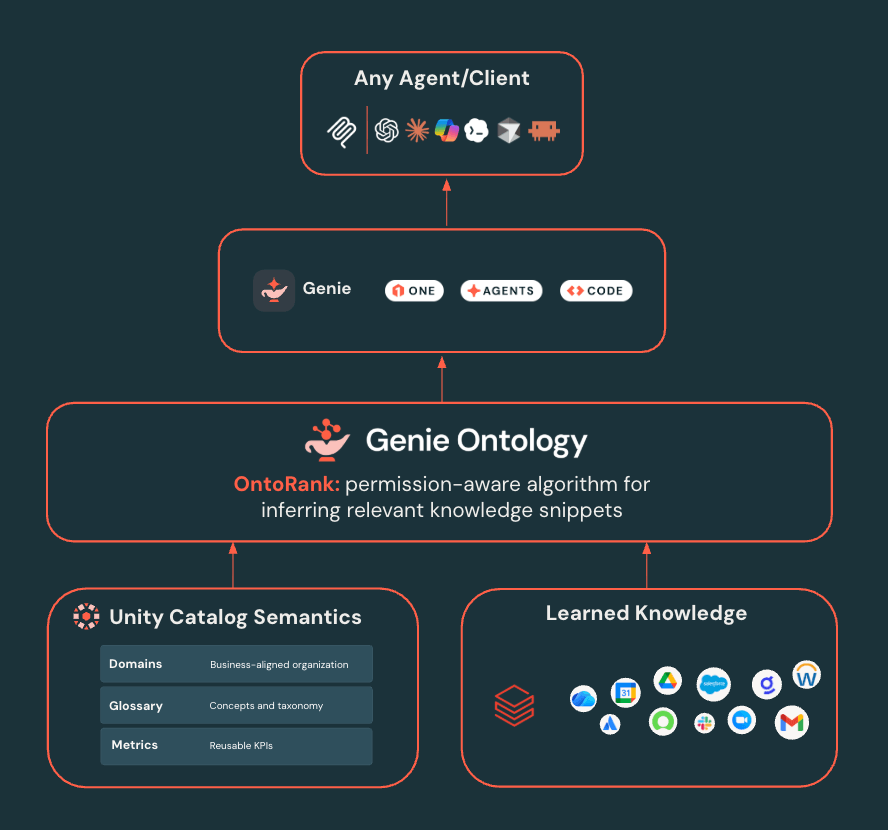
Genie One is the primary business user experience: a data-smart AI coworker where people ask questions, receive cited answers, and take action.
Genie Agents are scoped, domain-specific agents. An agent scoped to contract analysis can pull the renewal date out of a PDF, join it against your revenue tables, and flag the accounts at risk, all in a single pass.
Genie Ontology maps business terms, metrics, and relationships into a living graph, weighting sources by authority. You govern the ground-truth concepts that matter most through metric views, Pages, and Domains. Genie infers the rest, covering the corners you'd never finish documenting by hand.
Unity Catalog is the governance foundation. It enforces permissions, masking, lineage, and auditing at query time, so users and agents only access authorized data. Genie Ontology also extends permissions enforcement to third-party applications and data, enabling a truly unified governance layer.
Phase 0: Foundations, before the pilot
Objective: prove that your data and insights can be made accessible through Genie.
A week invested here sets your team up for long-term success with Genie. Here are the general steps that teams should follow:
- Start with one team and one clear question set. Choose a team with a recurring, currently painful need. Say it's sales operations, and the question set is pipeline health: what's in the funnel, what’s moved, what's at risk.
- Define your semantic layer. Genie treats these as authoritative, so precision here produces precision downstream. For sales ops, here is the order it can be worked through:
- Domains are how assets get organized by business purpose. Set up a Sales Ops domain and the opportunity tables, pipeline dashboards, and Genie Agents all live together where people go looking for them. Do this one first, because Pages have to belong to a domain and you'll be blocked otherwise.
- Metric views cover the 10 to 20 numbers people argue about. Bookings, pipeline coverage, win rate, stage conversion. You write the measure once and people can still slice it by rep or region or quarter when they query, which means everyone's pulling from the same definition rather than whatever their dashboard happened to hardcode.
- Pages are where you explain the concepts behind those numbers. A Page for "qualified opportunity" holds the definition, the other names people call it, and the assets it draws from. Genie One will reach for that before it guesses, and it cites the Page in the answer so anyone can go check your work.
- Assign owners. Every catalog asset, ontology fragment, and agent should trace to someone accountable, whether that's an individual or a team with a real intake path. Centralized semantics teams do this well. What breaks is ownership that exists on paper but has no route to a fix when a definition drifts.
- Establish governance and observability. Provision pilot users at the account level. Grant the Consumer access entitlement to users at the workspace level, and grant asset permissions, such as SELECT on the Unity Catalog objects behind your metric views, granted through groups, plus CAN USE on one SQL warehouse. Confirm column masking. Enable audit logs. Turn on Ontology Snippets,, and turn on Unity Gateway controls for usage and cost visibility. It's best to do this while the footprint is five users, not five hundred.
- Define what "good" means. Document 25 to 50 real questions the team asks, with known-correct answers. For sales ops: "what's my coverage ratio for Q3," "which deals slipped out of this quarter," "how does EMEA win rate compare to last year." If you can't answer them yourself, you can't grade Genie's answers either.
Score Genie against your question set before the pilot and again after any change to your semantics. The misses here are the useful part, becasue they signal possible gaps in the defined semantics. Genie hands back a coverage ratio that looks off? That's usually not the model. Nobody ever defined pipeline coverage as a metric view, so Genie filled the gap with something reasonable and wrong. Each miss is a pointer to the next thing worth governing.
Phase 1: The first-team pilot
Objective: prove Genie Agents deliver trustworthy answers in one domain to a small, engaged group.
- Recruit 5 to 10 pilot users who will give candid feedback.
- Run an evaluation weekly. Log every incorrect answer and every "I don't know," then address the root cause—typically a missing definition, an ambiguous column, or a gap in the ontology.
- Set exit criteria in advance. Decide what "ready" looks like before the pilot starts. Three things to watch:
- Accuracy holds steady at a bar you'd stake a real decision on.
- Pilot users reach for Genie over their old workflow without being asked.
- The backlog of definition fixes is shrinking rather than growing.
The clearest sign Phase 1 has worked is behavioral: a pilot user answers a colleague's question by forwarding a Genie response instead of filing a request.
Phase 2: Expand to adjacent teams
Objective: prove that agents can expand beyond your first pilot.
- Add two to three adjacent domains, each with its own semantics, owner, and evaluation set. Reuse the Phase 1 template.
- Promote shared definitions into the ontology so "revenue" and "active customer" mean the same thing across every agent. Keep definitions that are team-specific in their own domain.
- Add a lightweight review workflow. Expansion to new teams happens only after the owner passes an evaluation bar and a governance check covering permissions, masking, and sensitive columns. Keep it lightweight.
- Watch for drift. Give each Page an owner and a review cadence, and review metric view changes rather than discovering them later. A definition that diverges from its source query does not produce one wrong answer; it propagates wrong answers wherever the definition is referenced.
- Build a community. A dedicated Slack channel, monthly office hours, and a short guide on asking effective questions. Adoption spreads through colleagues reporting that it worked, and a public channel is the most efficient way to make that visible.
Phase 3: Organization-wide AI coworkers
Objective: make Genie One the default AI coworker across your team.
- Roll out account-level Genie One access so people get one AI coworker across domains, with cross-workspace reach where appropriate. Turn on automatic identity management and grant against the groups you already maintain in your identity provider, so users show up on first login.
- Add workspace instructions so each chat conversation has guidelines for how the chat should respond.
- Federate ownership. A central platform team owns the ontology, standards, and guardrails; domain teams own their agents and definitions. Centralizing everything creates a queue; standardizing nothing creates contradictory agents that erode trust.
- Govern what Genie One can reach. Unity Gateway extends the governance past the data, to the tools that Genie One uses. MCP servers become securables you grant on, tool filtering narrows what Genie can call, and service policies inspect what goes in and comes back.
- Meet people where they work. Enable users on the iOS and Android apps so they can chat with Genie on the go, and if they prefer to work in Slack, Teams, Excel, or Google Sheets, you can embed Genie in those tools, allowing them to ask questions in-context. Or if they’ve standardized in another agent entirely, use the Genie MCP App to ensure they continue benefitting from the Genie Ontology.
A realistic timeline
- Phase 0: 1 to 2 weeks
- Phase 1 pilot: 4 to 6 weeks
- Phase 2 expansion: the following quarter
- Phase 3 organization-wide: the one to two quarters after that
Move to the next phase when the evidence says you're ready; if the pilot needs more time to sort out definitions, then it makes sense to use the additional time to ensure a smoother rollout.
Start with one team
The teams that get this right usually aren't the ones with the cleanest data or the biggest platform org. They started with one team, one governed domain, and a set of questions they were willing to be judged on, got it working, and earned the room to expand from there.
Review the Genie documentation to get started setting up your first Genie Agent today.
Get the latest posts in your inbox
Subscribe to our blog and get the latest posts delivered to your inbox.