Managed Postgres: What Lakebase Actually Takes Off Your Plate
See what Lakebase actually automates in managed Postgres — patching, scaling, failover, and backups — and where responsibility still sits with you.
- Managed Postgres should take routine database operations such as patching, scaling, failover, and backups off the database team's plate.
- Lakebase runs PostgreSQL on serverless infrastructure with automatic scaling, scale-to-zero, point-in-time recovery, branching, pgvector, and PostGIS.
- Lakebase handles most managed Postgres operations within a region, while cross-region disaster recovery still requires customer-managed recovery procedures.
Every Postgres vendor calls itself "managed." Few of them agree on what that word covers. Some mean they patch the operating system (OS) and leave the rest to the database team. Others mean the database scales, handles failures, and backs itself up without anyone on the team touching a config file.
Managed Postgres is a database service where the provider operates the underlying infrastructure and handles core database operations such as patching, scaling, failover, and backups, so the database team spends less time on maintenance and more time building the application that runs on top of it. The more of those operations the provider owns, the less database administration stays with the customer.
That distinction matters more as Postgres moves into AI applications. The database may now hold application state, conversation history, embeddings, and agent data alongside traditional transactional workloads, so the operational surface extends beyond keeping the database running.
Lakebase Postgres takes that managed approach to serverless Postgres, combining automatic scaling, PostgreSQL compatibility, recovery, and Databricks integrations. The question is how much operational work it actually removes.
TL;DR
- Managed Postgres should take routine database operations such as patching, scaling, failover, and backups off the database team's plate.
- Lakebase runs PostgreSQL on serverless infrastructure with automatic scaling, scale-to-zero, automatic snapshots, point-in-time recovery, branching, and support for popular extensions like pgvector, and PostGIS.
- Lakebase handles most managed Postgres operations within a region.
What Managed Postgres Actually Means
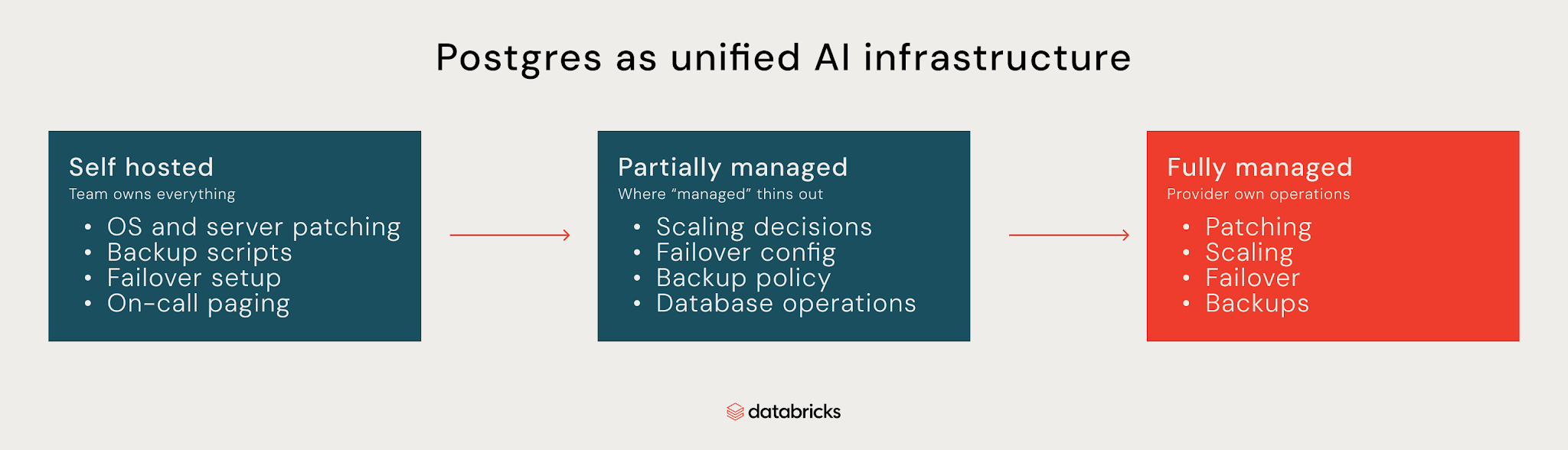
Think of managed Postgres like handing over the keys to a database. How much a team hands over depends on the provider. At one end, the database team still handles the server, backups, failover, and scaling. At the other, a fully managed service takes care of the operational work for the team, not just the infrastructure underneath it. Most providers sit somewhere in between, handling the VM and network while leaving some database operations, scaling decisions, failover configuration, and backup policy to the team.
A provider can patch the OS and call the database managed while the team is still responsible for the work that keeps it available and recoverable.
Patching, scaling, failover, and backups are a good place to draw that line. A managed service also determines how much of the security, recovery, migration, AI workloads, and developer tooling around Postgres your team still has to own.
Managed Postgres is a service where the provider operates the database infrastructure and handles core operational tasks such as patching, scaling, failover, and backups. A fully managed service takes responsibility for those operations, so your team can focus on building against Postgres rather than running it.
What Managed Postgres Should Handle
The clearest test of where a service falls on that spectrum is whether it takes these four operational tasks off the team's plate:
Maintenance and patching
A managed provider should apply OS patches, minor PostgreSQL versions, and routine maintenance like vacuum tuning without the database team scheduling or executing any of it by hand- the opposite of self-hosted Postgres, where all of that sits with them. Major version upgrades still need planning, since extensions and application behavior can shift, but a good provider keeps that involvement to a minimum and makes the upgrade path clear.
Scaling
Capacity should adjust to the workload without platform engineers resizing infrastructure by hand: vertical scaling for more compute or memory, read replicas for read traffic, and ideally serverless scaling that removes the decision entirely. Lakebase's autoscaling is one example in production, enabling 5x faster Postgres writes than standard Postgres. The real test is a traffic spike: if the database team is watching utilization and waiting on a resize, scaling is still their job.
High availability and failover
The database should stay up when infrastructure fails, without an on-call engineer manually promoting a replica at 2 a.m. Some providers handle this with standby instances that take over automatically; others, like Lakebase, replace the failed compute outright since it holds no durable local state. Still, not every provider fails over at the same speed or with the same data loss. Some lose seconds of writes in the process; others lose none. That's the detail worth checking before trusting the label, including whether failover exists and what happens to in-flight writes when it kicks in.
Backups and recovery
Automatic backups and a restore process teams can run without a support ticket are the baseline. Point-in-time recovery (PITR), restores to a specific moment instead of just the last snapshot, which matters when a bad migration corrupts data mid-afternoon. A full region going down is a bigger problem, measured by Recovery Time Objective (RTO), how long you're down, and Recovery Point Objective (RPO), how much data you can afford to lose, and a provider without defined numbers for both doesn't have a disaster recovery plan, just a guess.
How Managed Postgres Protects Your Data
A managed database should encrypt data at rest and in transit, control who can access it, and give data teams visibility into database activity. That means:
- Encryption: Data needs protection at rest and in transit, on disk and moving between your application and the database. The detail worth checking is who controls the keys, since some providers manage encryption entirely on their end, which becomes a problem the moment a compliance requirement or internal policy says the organization needs to hold them. Customer-managed keys give you that control while leaving the underlying database operations with the provider.
- Access control: Role-based access control handles the basics, different users and services getting different privileges, but production systems often need more, and industries handling payment data have to meet standards like the Payment Card Industry Data Security Standard (PCI DSS) on top of that. Attribute-based access control through Unity Catalog extends those policies further by considering properties of the user, resource, or request rather than relying on roles alone.
- Audit logging: Without visibility into who did what and when, investigating an incident gets harder, and so does proving compliance. Audit logging should give data teams visibility into database and administrative activity by default, not something they have to configure, operate, and maintain as a separate pipeline on top of the database.
What to Consider When Migrating an Existing PostgreSQL Database
A migration can look straightforward until the new database doesn't support an extension, configuration, or PostgreSQL feature an application relies on. Check what the application depends on before moving anything. Here are the key things to consider when migrating an existing PostgreSQL database:
- Compatibility: Check whether the current setup behaves the same way on the new platform: PostgreSQL version support, custom configuration, and application-level assumptions that might not hold once the infrastructure changes. Standard Postgres wire protocol compatibility means existing connection strings, object-relational mappers (ORMs), drivers, and tools have a real chance of working without code changes.
- Extensions: Migration is where teams find out whether every extension the database relies on made the trip, so check the provider's supported list against what's actually in use before committing to anything. pgvector is worth checking for AI or embedding workloads, PostGIS matters for geospatial data, and every other extension an application depends on is worth checking individually rather than assuming a popular one will be there.
- Migration methods: Dump-based migration, exporting and restoring on the new platform, is simple and works for smaller databases or planned maintenance windows. Logical replication keeps the source live while streaming changes to the destination, letting teams cut over with a much shorter interruption once the two are in sync, and the right choice comes down to database size, write volume, and how much downtime the business can absorb.
- Validation and cutover: A migration isn't done just because the data moved. Run the actual query workload against the new database and compare results and performance against the source, since matching row counts isn't enough; query plans, response times, and application behavior all need to hold up. Plan the cutover with a rollback path in mind, so the team knows how to point traffic back if something goes wrong, rather than figuring it out mid-incident.
The agentic AI playbook for the enterprise

Is Postgres Good for AI Applications?
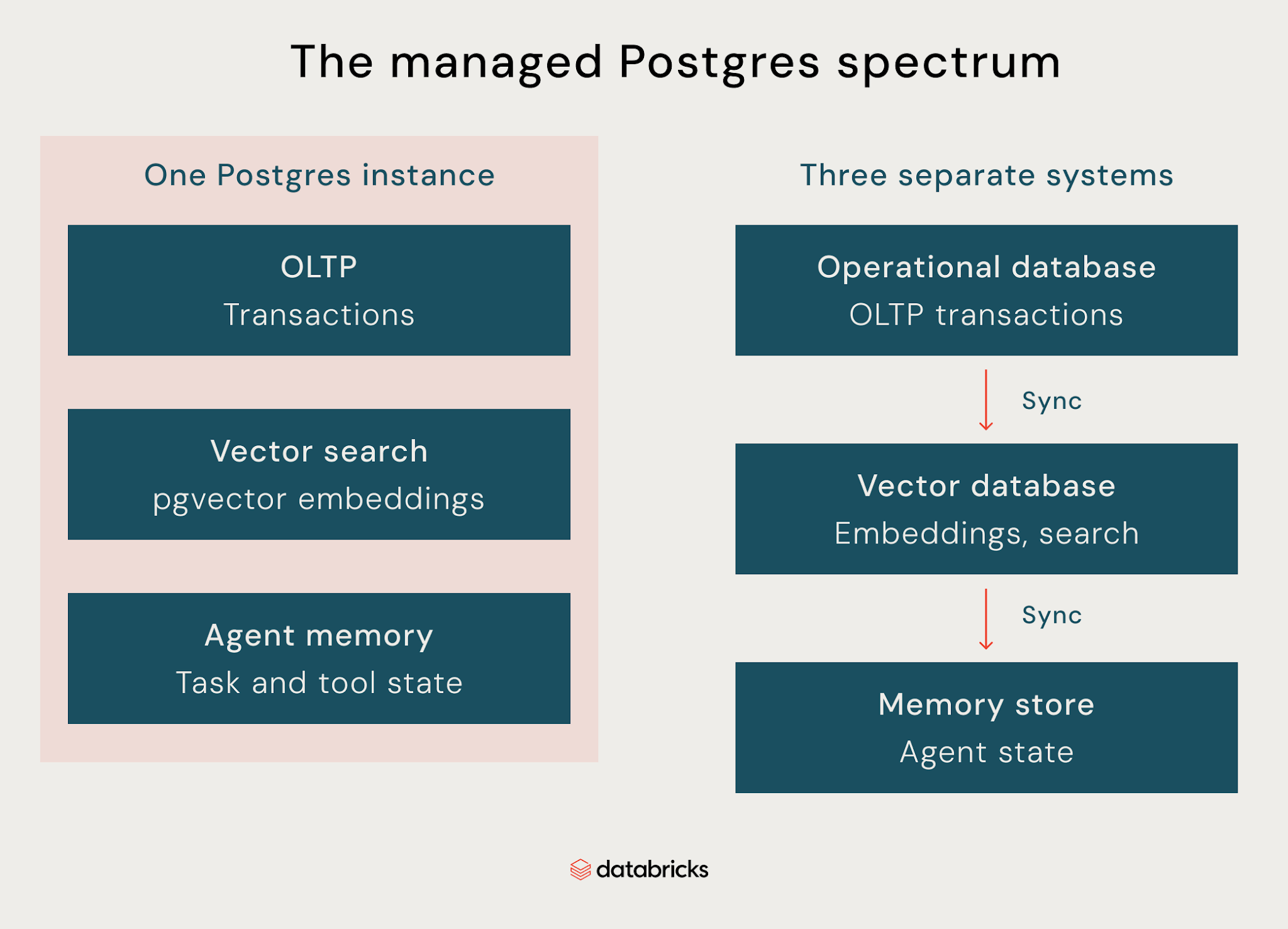
Postgres can be a strong fit for AI applications when an application needs transactional state and vector search in the same system. That comes down to four things: pgvector as the extension that makes it possible, vector search for retrieval, large language model (LLM) memory for persisting state between requests, and agent workloads that need both at once.
pgvector
pgvector adds a vector data type and similarity search indexing directly inside Postgres, so embeddings live next to the rest of your application data instead of in a system of their own. The tradeoff is that a separate vector database means keeping embeddings and operational data in sync becomes its own engineering problem, which pgvector removes for workloads that don't need a dedicated vector store.
Vector search and semantic search
pgvector lets you store embeddings and use approximate nearest neighbor (ANN) indexes to find similar vectors efficiently as the dataset grows, which is what makes semantic search, retrieval-augmented generation, and meaning-based matching possible inside Postgres. The right indexing strategy still depends on dataset size and query patterns, so pgvector doesn't remove the need to evaluate performance for your specific workload.
LLM memory
LLM applications need somewhere to keep state between requests, including conversation history, user preferences, retrieved documents, and tool results. Postgres can store that state as ordinary relational data while pgvector handles the embeddings in the same database. For workloads needing specialized vector retrieval at very large scale, a dedicated vector database may still make sense, but many AI applications can keep operational state and retrieval together.
Agent workloads
Agents continuously read and update state as they run. They track conversations, store intermediate results, and record tool calls, which makes the database part of the agent's execution layer rather than just somewhere to retrieve context. A database built for AI agent workloads needs to support both that constantly-changing transactional state and the retrieval the agent uses to find relevant context, in one system.
Postgres for Application Development
Beyond running production workloads, Postgres needs to support how your team actually builds. That means connections don't become a bottleneck as you scale, and testing schema changes doesn't mean risking production data.
Connection management
Postgres has a finite limit on how many connections it can hold at once, and application instances scaling horizontally can hit that limit before compute or storage becomes the bottleneck. Connection pooling reuses established database connections across requests instead of opening a new connection for each one. In a managed service, what matters is whether pooling is built in or something your team has to operate separately.
Database branching
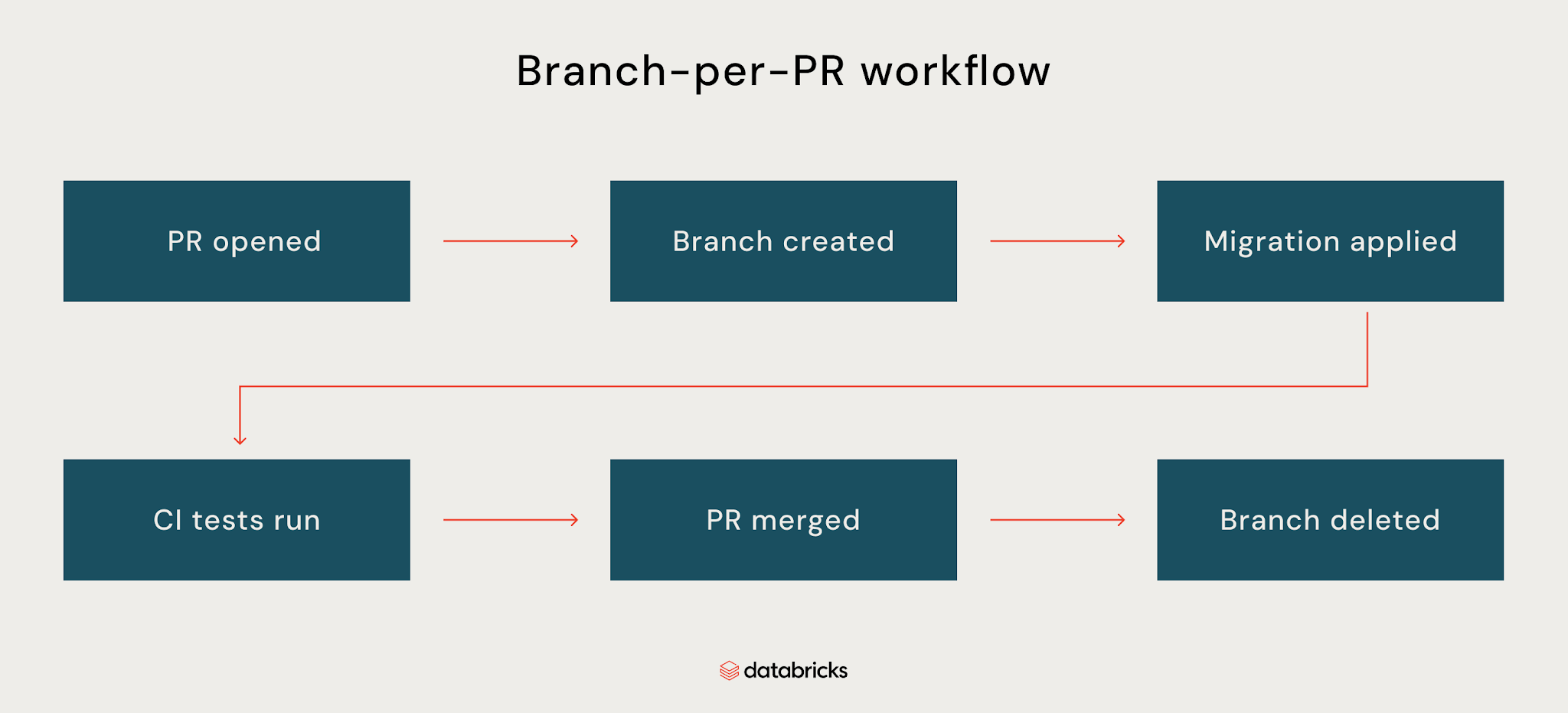
Testing schema changes against production data means risking production or maintaining a staging database that drifts out of sync over time. Database branching creates an isolated environment from an existing database state or point-in-time snapshot, so developers can test migrations against realistic data, work like evolutionary database development, and delete the branch once it's no longer needed.
Why Lakebase on Managed Postgres
Lakebase's approach becomes clearer when you map it against the core jobs managed Postgres should handle:
- Serverless: Lakebase runs PostgreSQL on serverless compute that scales with demand automatically, including down to zero when idle, so there's no need to size an instance upfront or pay for unused capacity. Databricks reports up to 5x higher Postgres write throughput with Lakebase in its testing, although the result depends on workload and configuration.
- PostgreSQL compatibility: Lakebase uses standard PostgreSQL connectivity, so existing drivers, ORMs, and tools like psql, pgAdmin, and DBeaver connect the same way they would to any other Postgres instance, with no proprietary protocol standing between the application and the database.
- Reliability: Lakebase runs secondary compute in separate availability zones and automatically promotes it if the primary fails, keeping the connection endpoint unchanged. The database team doesn't have to manually promote a replica or reconfigure the application during the incident.
- Pricing: Compute scales with the workload instead of a permanently provisioned instance, and charges stop once the database suspends. Storage is billed separately.
- Lakehouse integration: Lakebase connects to the rest of the Databricks platform rather than operating as an isolated Postgres service. Synced tables make Unity Catalog data available to Postgres applications without a custom sync pipeline, and Change Data Feed, currently in Public Preview, exposes database changes for downstream processing in the lakehouse.
What leaves the team's plate
The table below shows which database operations Lakebase handles and which ones still stay with the database team:
| Dimension | What Lakebase handles |
|---|---|
| Patching | Automatic PostgreSQL, security, OS, and compute updates |
| Scaling | Automatic scaling, including scale-to-zero when idle |
| Failover | Automatic failover to secondary compute within a region |
| Backups and Recovery | Point-in-time restore with configurable 2-30 day history, plus scheduled snapshots for additional backup protection |
| Disaster recovery | Private Preview, AWS only. Periodic replication with manual failover and customer-managed recovery procedures. |
| Encryption | At rest and in transit, customer-managed keys available |
| Access control | PostgreSQL roles and permissions, with Unity Catalog integrations for broader governance. |
| Extensions | pgvector, PostGIS, and other supported PostgreSQL extensions |
| Connection pooling | Built-in PgBouncer |
| Branching | Copy-on-write, no duplicated storage |
| Lakehouse integration | Synced tables and Change Data Feed |
| Pricing | Serverless, scales with workload, suspends when idle. Storage billed separately. |
Patching, scaling, failover, and backups all run automatically per the table above. Disaster recovery is the exception: still Private Preview, AWS only, with manual failover and customer-managed recovery procedures behind it. That's the detail worth checking before counting on Lakebase for anything spanning regions. Learn more about Databricks Lakebase.
Wrapping Up
"Managed" means something different depending on who's selling it, from patching the OS and calling it done to owning the full weight of running a production database: scaling, failover, backups, security, migration, AI workloads, and the developer experience around all of it.
Lakebase clears that bar on most of it. Patching, scaling, and failover run without your team stepping in; point-in-time recovery is built in, and security, extensions, connection pooling, and branching all come with the service. Cross-region disaster recovery is the one exception, still in Private Preview with manual failover, not the same automatic protection Lakebase provides within a region.
For teams evaluating managed Postgres, the important question is how much of the operational work actually leaves their plate. Lakebase handles most of that work within a region, while cross-region disaster recovery remains an area where teams still have responsibilities.
Frequently Asked Questions
What is the difference between managed and self-hosted Postgres?
Self-hosted Postgres puts every operational task on the database team: patching, scaling, failover, backup policy, disaster recovery. Managed Postgres shifts some or all of that to the provider, but the amount shifted varies widely. Partially managed services handle infrastructure and leave the rest to the customer. Some fully managed services also include security tooling, migration assistance, and developer workflows such as database branching.
What is serverless Postgres?
Serverless Postgres is a managed database model where compute scales automatically with demand, removing the need to provision a fixed instance size. Some providers scale compute to zero when the database is idle, while others keep a baseline of capacity. Pricing typically follows the compute used rather than a permanently provisioned instance.
How does database branching work in Postgres?
Database branching creates an isolated, copy-on-write branch of a database without duplicating the underlying storage. Each branch can hold its own compute and data changes without affecting production. Teams use it to test schema migrations against real data, spin up a branch per pull request, or restore a branch from a specific point in time, then delete it once the work is done.
Get the latest posts in your inbox
Subscribe to our blog and get the latest posts delivered to your inbox.