Your data, your storage, your rules: a 2026 guide to storing Unity Catalog managed tables
Your managed table data lives in cloud storage you own, at a location you control
by Elizabeth Bowman and Isabel Dong
- Unity Catalog managed tables store your data in cloud storage you own, at a path set by the managed storage location on your metastore, catalog, or schema.
- As organizations change, teams can get stuck with data in an inherited location they never chose. SET MANAGED LOCATION changes where new tables land, and converting external tables moves their data into the location you set.
- You stay in control of where your managed table data lives, whether that's one location or separate storage for compliance and cost attribution.
Unity catalog managed tables allow you to control the placement of your data when your organization needs separate storage. Unlike other data platforms, Databricks table data remains in a cloud storage account that you own such as your S3 bucket, your ADLS container, or your GCS bucket.
Unity Catalog managed tables automate table management. Whether you store your Unity Catalog managed tables in Iceberg or Delta formats, Databricks handles the data layout, tuning, and cleanup for you where you choose, applying optimizations automatically as your tables change.
This blog explains how the managed tables storage model works, and how you can choose or change a Databricks managed storage location.
Your tables stay in storage you own
When you bring your own cloud storage, managed table data lands in a cloud account you own. You keep ownership of that storage and visibility into how your data is organized. You have the ability to inspect, audit and apply our own bucket policies, as well as control the location of your data.
Unlike other platforms with managed or native table offerings that hold tables in provider-controlled storage or proprietary data formats, at Databricks, your data stays in your own account.
Open by design
Keeping data in your own cloud account is only one part of what makes managed tables at Databricks open. Unity Catalog is the only major catalog in the industry that lets you be the owner of your data with full governed read and write access across Iceberg and Delta, with ability to federate to tables others own in open formats, using open standards.
External tools such as Apache Spark™, Flink, Trino, Kafka connect and Snowflake can read and write to managed tables through the Iceberg Rest Catalog and Unity Catalog's Open APIs. Secure access is made possible through Open APIs and credential vending, allowing external tools to interact with governed data without duplicating it. This simplifies architecture and enables a single source of truth across analytics and AI workloads.
When you bring your own storage, files remain accessible in your cloud account while Unity Catalog governs access to them.
You control where your data lives
With managed tables in Databricks, you can decide where managed table data lands. Set a managed storage location once at the metastore, catalog, or schema level, and every table underneath inherits it. The most specific level wins: a schema's location takes precedence over its catalog's, and a catalog's over the metastore's. You can set a broad default and override it wherever a team or domain needs its own storage.
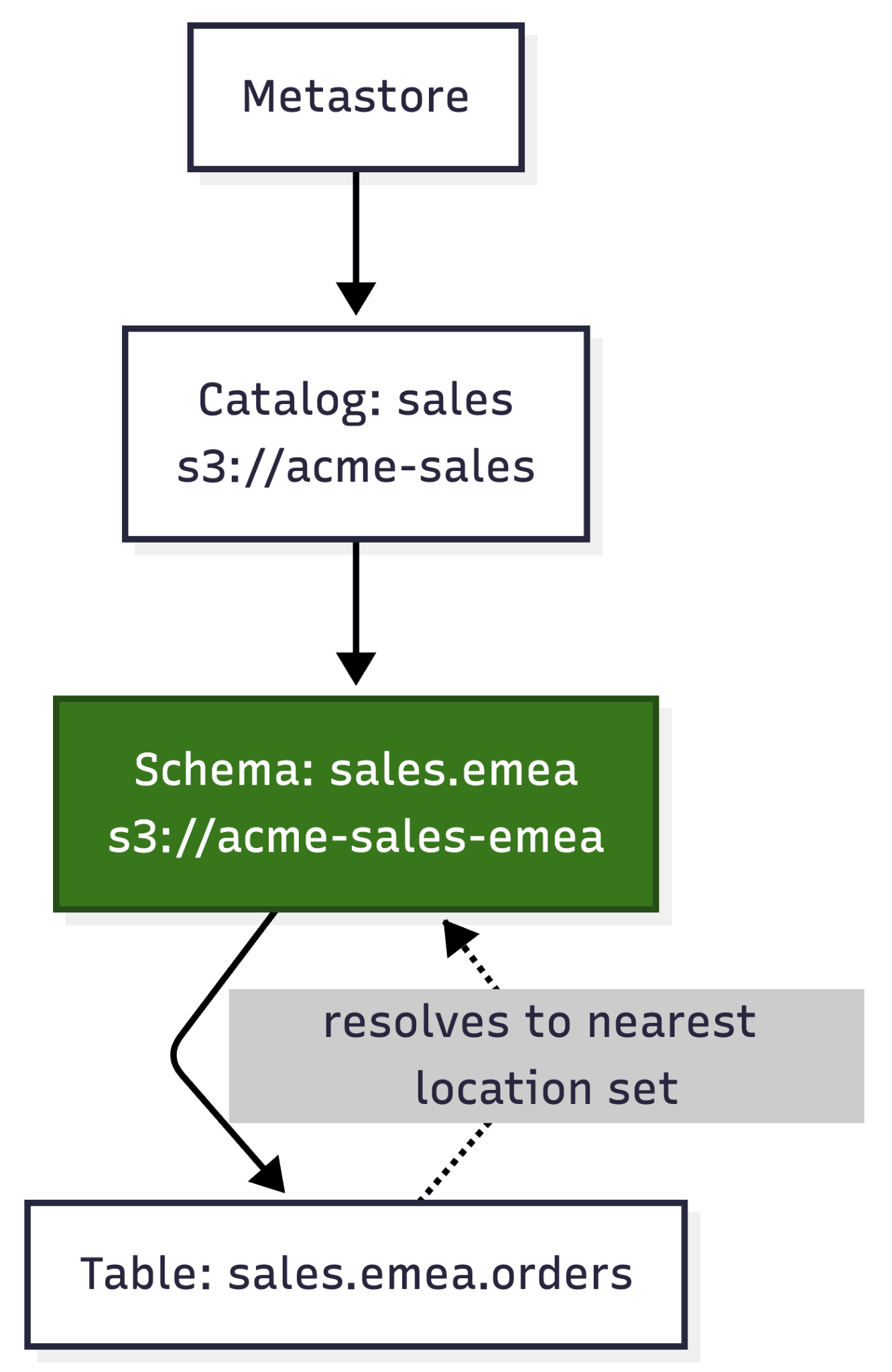
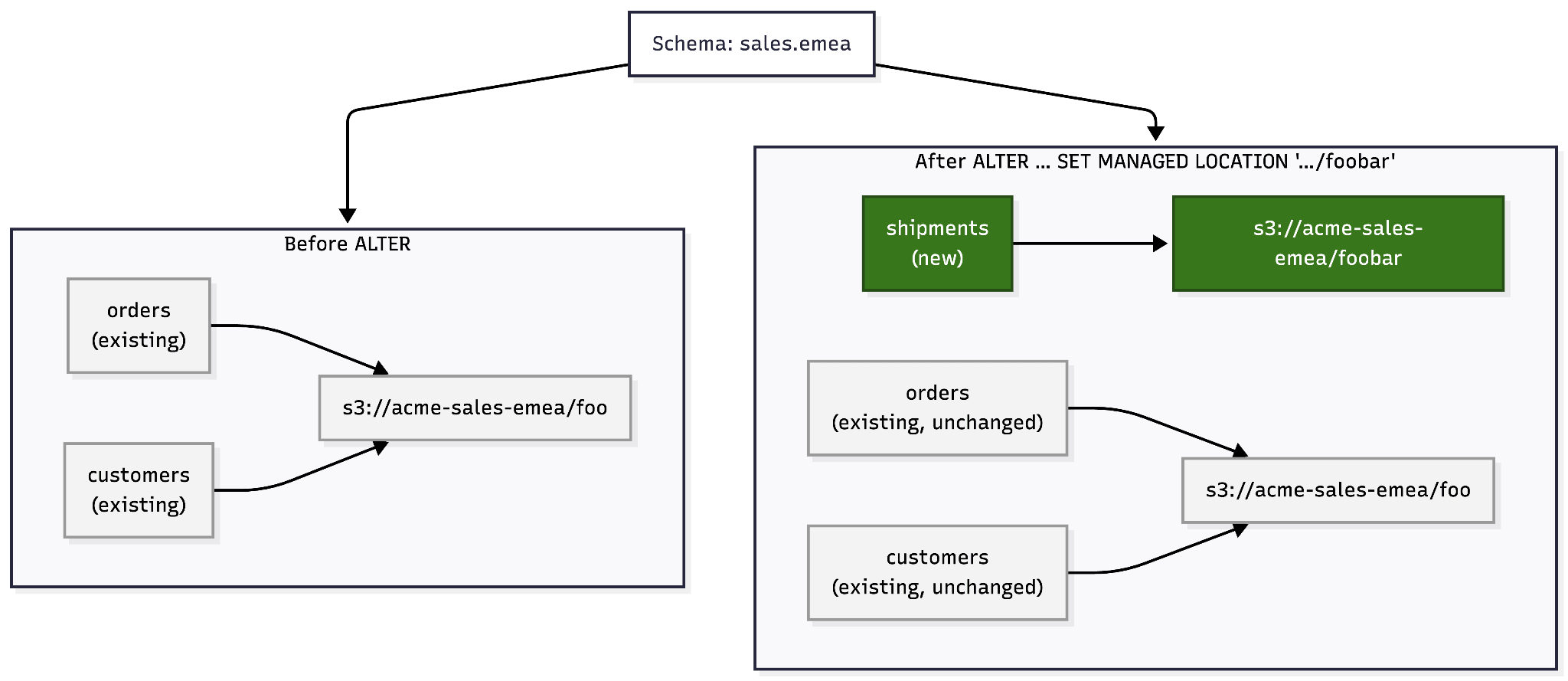
That control isn't fixed at setup. As your organization changes, ALTER CATALOG or ALTER SCHEMA ... SET MANAGED LOCATION points new tables and volumes at a new location, while everything already written stays where it is.
More control when you need separate storage
Most teams organize their data logically, through catalogs and schemas, and never have to think about where the underlying files physically live: the managed storage location that their catalogs and schemas inherit is all they need. Combined role and attribute-based access controls in Unity Catalog, this approach satisfies standard GDPR data segregation requirements.
Some organizations, however, need boundaries that extend into the physical storage itself. A line of business might need separate storage for administration or cloud cost allocation. Or regional and regulatory rules might dictate where certain data physically resides. In those cases, you can give a specific catalog or schema its own managed storage location, so that the physical placement of the data lines up with the boundary that requires it.
Choose where data lands when you convert to managed
When you convert an external table to managed, the data lands at the managed storage location its catalog or schema currently resolves to. If that external table already sits in an ad hoc or non-standard place, you may want the managed table somewhere else, in the storage you use for that domain today.
During conversion, Databricks copies the table's data and transaction log into the managed storage location you set, so the managed table lands where you chose.
Summary
Managed tables automate table maintenance while your data can remain in storage you own. That differs from other managed platforms that hold table data in provider-controlled storage. You can control placement at the metastore, catalog, or schema level, change where new tables land, and choose a location when converting an external table to managed. Your data stays in open formats, reachable through Iceberg Rest Catalog and Unity Catalog open APIs.
When you're ready to set or change a managed storage location, managed storage documentation covers the specifics.
Capability | Databricks Unity Catalog | Other Platforms |
Data stored in customer-owned storage | ✅ Yes | Often proprietary |
Open table formats (Iceberg and Delta) | ✅ Yes | Varies by format |
External tool read/write access with row and column-level governance | ✅ Via Iceberg REST Catalog or Unity Catalog Open APIs | Limited |
Can control the storage location at the catalog/schema level | ✅ SET MANAGED LOCATION | Uncommon |
Definitions
A lot of these terms reuse the same few words, which makes them easy to mix up. Here's what each one means in this post.
- Managed table: A table whose data and lifecycle Unity Catalog manages for you, also known as a Unity Catalog managed table.
- Managed storage location: The cloud storage path in customer-owned storage, where a metastore, catalog, or schema's managed tables and volumes are written. You set it with the
SET MANAGED LOCATIONclause. This is not the same thing as “managed storage” below. - External location: A Unity Catalog object that pairs a cloud path with a storage credential to govern access to that path. External locations govern both external tables and managed storage: a catalog- or schema-level managed storage location lives inside one.
- Customer-owned storage: A storage option where the underlying cloud storage is in a customer's own cloud account. This makes up the vast majority of tables in Databricks.
- Default storage: An alternative storage option where Databricks provisions the underlying cloud storage for you, instead of you bringing your own bucket.
- Databricks managed storage: This term is often used by other platforms to describe Databricks default storage. The vast majority of Unity Catalog managed tables today are kept in customer-owned storage, not in “Databricks managed storage”, nor “managed storage”.
- ALTER CATALOG / ALTER SCHEMA … SET MANAGED LOCATION: The command that changes where new managed tables and volumes for a catalog or schema are written. Existing tables are unaffected.
- External-to-managed conversion (ALTER TABLE … SET MANAGED): The command that converts an external table into a managed table. During conversion, the data and transaction log are copied into the current managed storage location.
FAQs
1. Where does Unity Catalog store managed table data, in Databricks-owned storage or my own cloud account?
In your own account. Managed table data is written to cloud storage in your own account, whether S3, ADLS, or GCS, at a managed storage location you set on your metastore, catalog, or schema. Databricks manages the table's layout and lifecycle, but the underlying files live in a bucket or container you own and register with Unity Catalog, not in a Databricks-controlled account.
2. Do Unity Catalog managed tables lock me into Databricks?
No. Managed tables use open table formats including Iceberg and Delta, that stay in cloud storage you own. External engines can write to and read from them through the Iceberg REST Catalog and Unity Catalog's open APIs, so your data isn't trapped behind a proprietary interface. You keep ownership of the storage, the data stays in open formats, and access happens over open standards. Managed tables are not lock-in: it is just as possible to move in or out of Databricks on managed tables as it is on external tables, in both cases you can keep your data in the same place physically.
3. Can I keep certain data in separate storage for compliance or data residency?
Yes. You can give a specific catalog or schema its own managed storage location, separate from everything else if need be, to keep data for different countries or regulatory regimes in distinct storage, or to attribute storage costs to a particular team or business unit.
4. Can engines and tools other than Databricks write to and read from my managed tables?
Yes. Managed tables are readable or writeable through the Iceberg REST Catalog and Unity Catalog's open APIs, so external engines such as Apache Spark, Trino, and Flink can access them. Unity Catalog handles governance for storage access, preventing data corruption that bypassing them can cause. Direct path-based access is also available through path-based redirect and Compatibility Mode.
5. Can I change where my managed table data is stored after it's set?
Yes. Use ALTER CATALOG … SET MANAGED LOCATION or ALTER SCHEMA … SET MANAGED LOCATION to point new tables at a different location whenever your organization that requires physical separation changes: a reorg, a new bucket, a new region. Existing tables stay exactly where they are, and new tables land in the new location. Whenever you convert an external table to managed, its data is copied into the location you've set, so you can move data into the right home as part of the same step.
6. Are Unity Catalog Managed tables the same thing as “Managed Storage”?
No. Unity Catalog Managed tables are not the same as Databricks default storage, “managed storage”, “Databricks managed storage”, or “Databricks-managed Iceberg storage”. The majority of Unity Catalog managed tables in Databricks are kept in customer-owned storage buckets in cloud accounts that customers own, rather than default storage (or “managed storage”).
7. Can customers use engines outside Databricks to read and write to Unity Catalog Managed Tables?
Yes. Customers can use any engine outside Databricks to read, write, and create Unity Catalog Managed tables in customer-owned storage, using the Iceberg REST Catalog or Unity REST API.
Get the latest posts in your inbox
Subscribe to our blog and get the latest posts delivered to your inbox.