Apache Spark™ Tutorial : Quick Start
Spark runs the same code on one machine or a thousand, and the entry point is small: read a table, transform it, act on it. This module walks that path from end to end with the DataFrame API and SQL, using a sample table that is already in your workspace. Every example runs as written, and the notebooks are linked if you'd rather not type. This module will guide you through your first Spark job and explain what happens underneath while it runs. By the end, you will have read a table, aggregated it, and written the same query two ways.
Learning objectives
By the end of this module, you can:
- Read a Unity Catalog table into a DataFrame and inspect its schema.
- Explain the difference between a transformation and an action, and why Spark waits.
- Aggregate a table with groupBy and count, and order the result.
- Write the same query as Spark SQL and as a DataFrame, and see that they are one job.
Using a coding agent? Copy this prompt to get started quickly:
What a Spark job is
Apache Spark is a unified analytics engine for batch, streaming, SQL, machine learning, and AI workloads. A job is the work Spark does to produce the result you asked for, and the same code describes that work whether the data fits on one machine or spans a cluster.
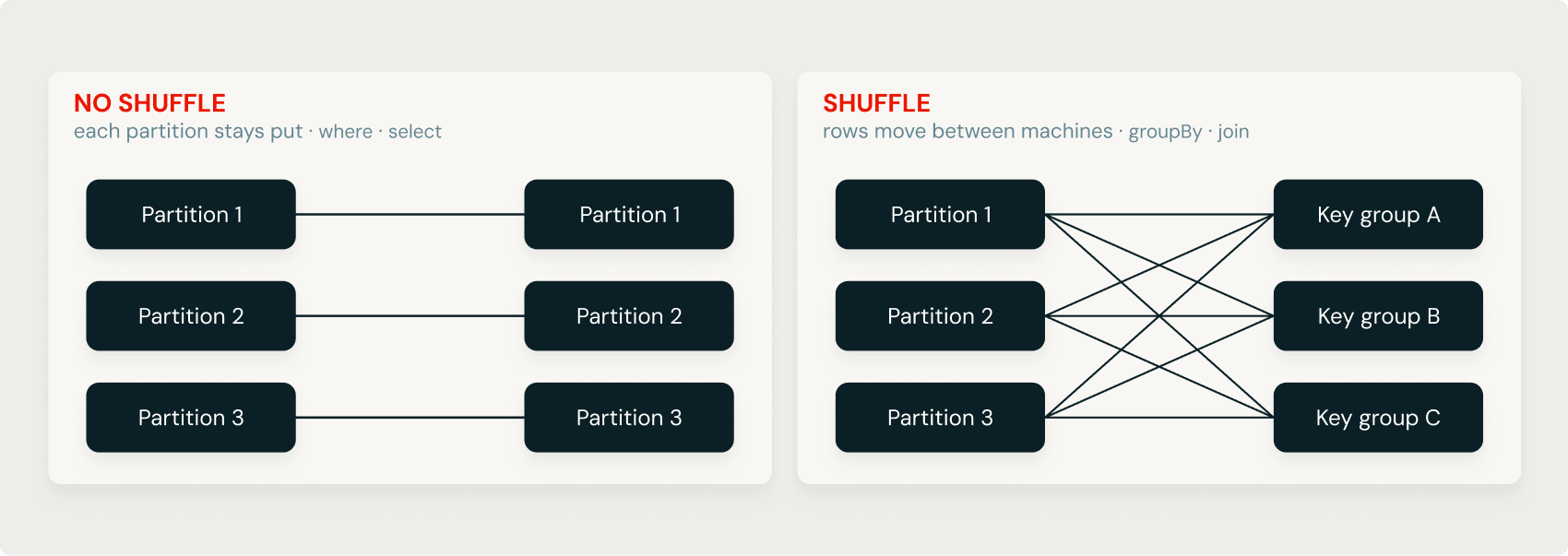
When running on a cluster, data movement is an important consideration. Spark is distributed: it splits the data into partitions and the work into tasks that run over those partitions in parallel. Operations that keep each partition independent, such as selecting columns or filtering rows, are cheap because they don’t require shuffling the data between partitions. Operations that regroup rows by key, such as grouping or joining, may require a shuffle to redistribute data across partitions. On a cluster, that can mean moving data between machines, making it the most expensive part of many jobs.
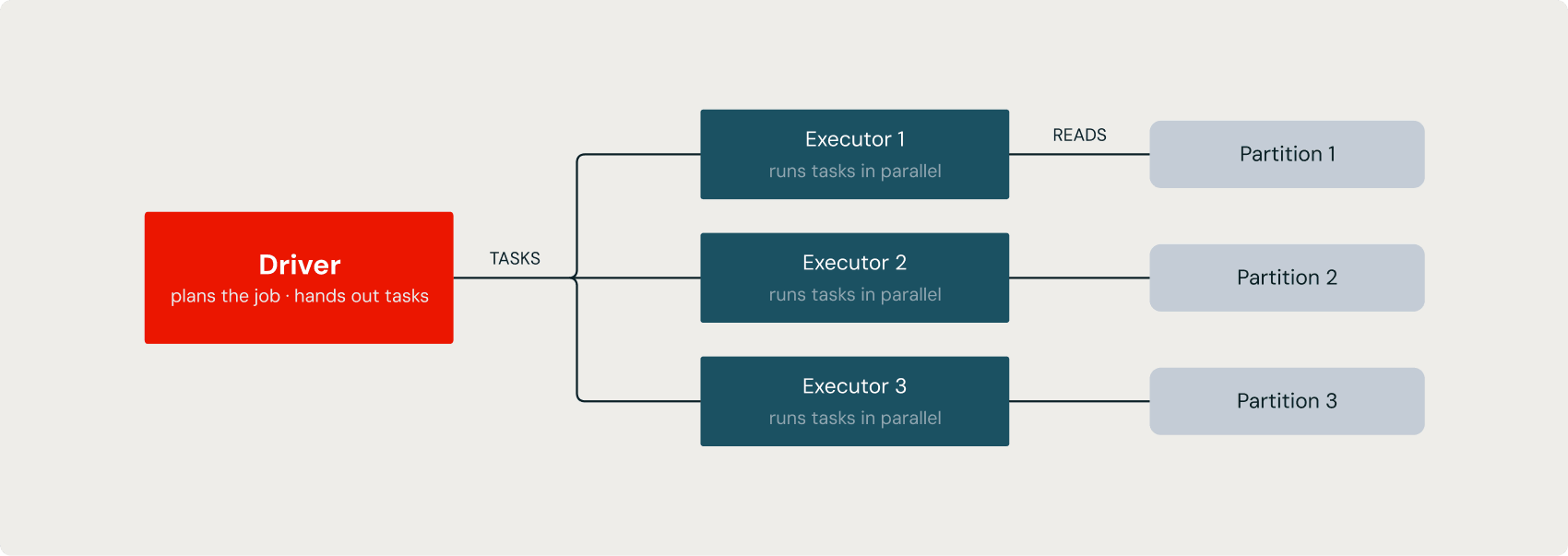
The driver plans the work and coordinates it, while the executors are the processes that do the work on the partitions. On Databricks serverless, both are provisioned for you.
How a job runs
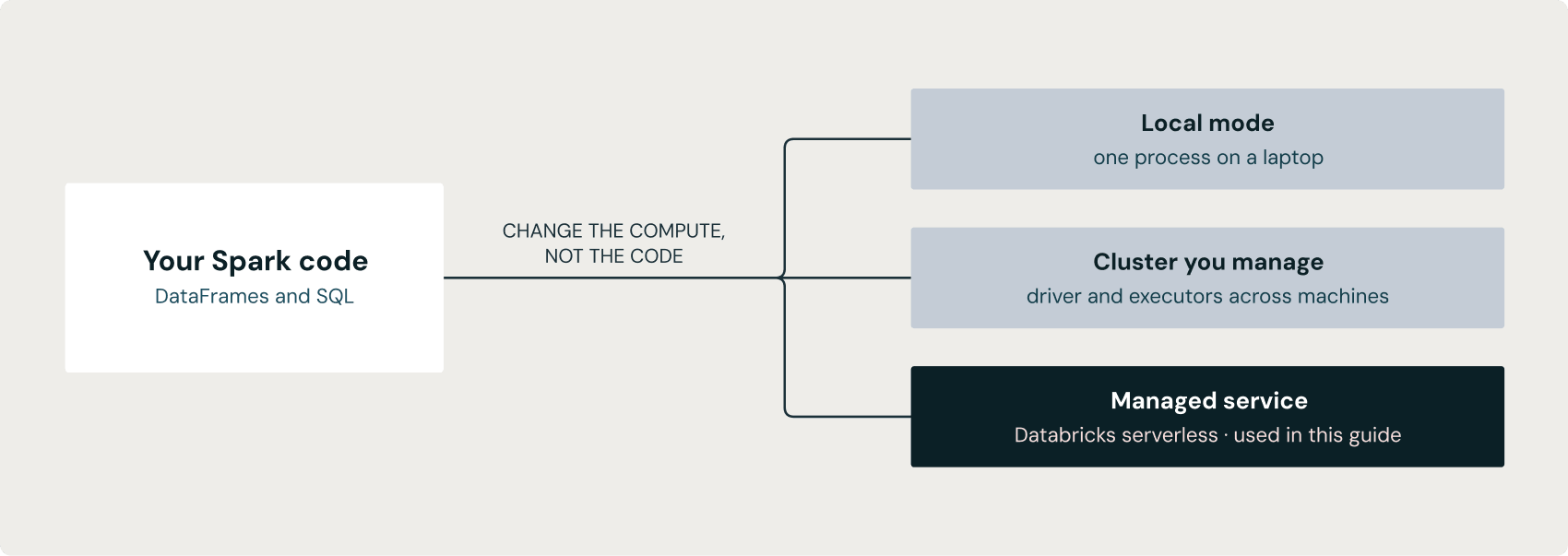
A Databricks notebook opens with a spark session already connected, so there is no session to create and no cluster to point at. Reading a table gives you a DataFrame:
This does not read any rows. Spark looks up the table in the catalog, learns its schema, and records the step in a plan. Building a DataFrame and knowing its columns costs almost nothing, because the data stays where it is.
That is the central idea in Spark: transformations are lazy. A transformation such as select, where, or groupBy returns a new DataFrame and adds to the plan, but runs nothing. The work happens only when you call an action, such as show, count, display, or write. At that point, Spark turns the plan into a job and runs it.
You can see the split by inspecting the DataFrame:
printSchema prints the schema Spark already resolved when you read the table, so it returns immediately without running a job:
Output
show is an action. It launches a job, reads the first rows, and prints them.
This ordering explains most of what surprises people in Spark at first. A chain of five transformations is one optimized job, not five passes over the data. A query can report an error when the action runs rather than on the line where you wrote the transformation. And a filter written after a join can still run before it, because the optimizer plans the whole chain before any data moves.
Read your first table
Databricks includes Unity Catalog sample tables you can query right away. samples.nyctaxi.trips holds about 22,000 New York taxi trips. Read it and look at the first five rows:
printSchema shows the columns and their types, and show prints the specified number of rows. For an interactive table you can sort and chart, use display:
Check the schema first, so a type problem shows up before you build on the data.
Aggregate it
Group the rows by pickup ZIP code and count each group:
groupBy is the step that does the expensive work, because every row with the same ZIP code has to end up in the same partition before it can be counted. The result has one row per ZIP code, far fewer than the roughly 22,000 input rows. Order it and show the busiest ZIPs:
The column created by count() is named count. orderBy moves the data again, because the ordering applies across all partitions, not within each one.
The same query in SQL
Spark SQL and the DataFrame API are two front doors to the same engine, so this is the same job written as a query:
Result
| pickup_zip | trips |
|---|---|
| 10001 | 1227 |
| 10003 | 1181 |
| 10011 | 1129 |
| 10021 | 1021 |
| 10018 | 1012 |
Both forms parse into the same kind of plan and pass through the same optimizer, so they return the same answer at the same speed. The DataFrame version returns these same rows; its column is named count instead of trips, because that is what count() names it. You can also hand a DataFrame to SQL by registering it as a view:
The view lasts for the notebook session, so the next query in the same notebook can use it.
Try it yourself
- Change the grouping column from pickup_zip to dropoff_zip and rerun the code. Do the busiest ZIPs change?
- Add a filter for fare_amount > 20 before the groupBy, and see how the counts change.
- Replace show(5) with display() and build a bar chart of trips per ZIP in the notebook UI.
Recap
- Spark is one distributed engine; a job splits into tasks over partitions.
- Transformations are lazy and build a plan; actions run the plan.
- Reading a table and printing its schema touches metadata, not rows.
- groupBy and orderBy move data across partitions, which is the expensive part.
- SQL and DataFrames are two interfaces to one engine and one optimizer.
What's next
DataFrames goes deeper on the structured API: declaring schemas, transforming, aggregating, joining, and reading and writing open table formats.